

Using Musaned becomes easier when you understand where to start and how to access its services. Whether you are creating an account, checking a visa, or reviewing a recruitment request, knowing the correct steps helps you avoid confusion.
Musaned is Saudi Arabia's official platform for domestic worker recruitment and management. It provides digital services for employers, domestic workers, and licensed recruitment providers.
This guide explains how to register for Musaned, log in through Nafath, find the services you need, and follow your requests. It also covers common account problems and practical ways to resolve them.
🪪 What Do You Need Before Using Musaned?
Before using Musaned, prepare the information required for your account or the service you want to access.
The requirements differ slightly between creating an account and signing in.
For account registration, you should have:
-
A valid Saudi national ID or Iqama number.
-
Your date of birth or Iqama expiration date, as applicable.
-
An active Saudi mobile number.
-
A valid email address.
-
A password that meets Musaned's security requirements.
Saudi citizens enter their date of birth. Non-citizens use their Iqama expiration date. Both dates are entered in the Hijri calendar.
You may also need the Nafath application on your mobile phone to complete identity verification during login.
For families planning to hire a maid, these preparations make it easier to begin the official procedures when required.
📋 Check Your Information Before Starting
Make sure your identification details are correct. Keep your registered mobile phone nearby and use an email address you can access.
Incorrect identification information may prevent you from completing a request or verifying your account.
You do not need to prepare every recruitment document simply to explore Musaned's public services. Additional requirements depend on the procedure you select.
📝 How to Create a Musaned Account
Creating an account allows eligible users to access the personalized services available through Musaned.
The current registration page requests identification details, contact information, and a password.
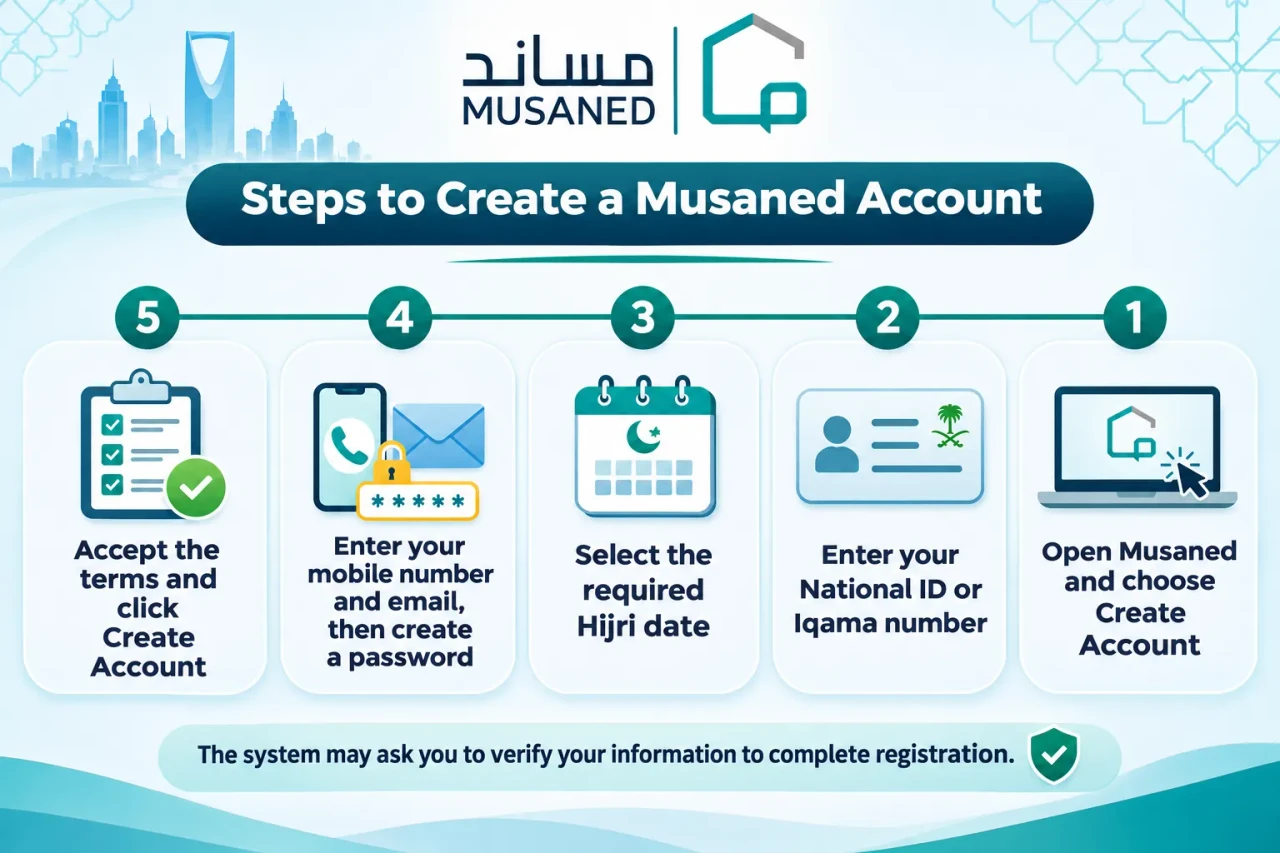
Step-by-Step Musaned Registration
-
Open Musaned's official website.
-
Select the login option, followed by "Create Account" if you do not already have one.
-
Enter your Saudi national ID or Iqama number.
-
Provide your date of birth or Iqama expiration date in Hijri format.
-
Enter your mobile number and email address.
-
Create a password and confirm it.
-
Review the terms, conditions, and privacy policy.
-
Accept the required terms and select "Create Account."
-
Complete any additional verification requested by the system.
Follow the instructions shown during registration. The exact confirmation screens may change when Musaned updates its services.
🔐 Musaned Password Requirements
Your password must meet the conditions displayed on the registration page.
These include:
-
At least eight characters.
-
At least one uppercase letter.
-
At least one lowercase letter.
-
At least one number.
-
A permitted special character.
Choose a password that is difficult for others to guess. Avoid using your name, identification number, or simple number sequences.
What Happens After Registration?
After completing the required registration steps, you can use the available account access options.
Your account provides access to services linked to your user category and eligibility.
Creating an account does not automatically mean that you have submitted a visa or recruitment request. Each service has its own process.
📌 Registration reminder: Use your own identification and contact details. Do not create an account using another person's information or share your login credentials with an unauthorized party.
🔐 How to Log In to Musaned Through Nafath
Musaned supports account access through Nafath, Saudi Arabia's national digital identity verification system.
Nafath helps confirm the identity of the person requesting access to an electronic service.
The current Musaned login page provides a dedicated option for signing in through Nafath.
Step-by-Step Nafath Login
-
Open Musaned's official website.
-
Select "Login."
-
Enter your national ID or Iqama number.
-
Choose "Login via Nafath."
-
Follow the authentication instructions displayed on the screen.
-
Complete the required confirmation through the Nafath application.
-
Return to Musaned after successful verification.
The verification process may require you to confirm a request on your registered mobile device.
Follow the instructions displayed in Nafath rather than relying on screenshots from older tutorials.
First-Time Users vs. Existing Account Holders
There is an important difference between registration and login.
| Action | Purpose | When to Use It |
|---|---|---|
| Create Account | Register your personal details with Musaned | When you do not have an account |
| Login via Nafath | Verify your identity and access your account | When signing in to use available services |
| Reset Password | Recover access to an account when needed | When you cannot use your existing password |
If you already have an account, use the login option rather than creating a duplicate registration.
🛡️ Keep Your Nafath Verification Secure
Never approve an unexpected Nafath authentication request.
Only confirm a login that you have personally started. Do not share verification codes or account passwords with anyone.
A recruitment office can guide you through the procedure, but personal identity verification must follow the official requirements.
🧭 Understanding the Musaned Services Menu
Once you understand account access, the next step is finding the service you need.
Musaned organizes its services into groups based on their purpose.
You can explore many service descriptions before beginning an application. Some transactions require you to sign in before proceeding.
Main Musaned Service Categories
| Category | Services You May Find |
|---|---|
| Visas | Domestic worker visas, visa inquiries, and related applications |
| Recruitment | Recruitment through licensed offices, candidate selection, and applicable recruitment routes |
| Worker Management | Employment contracts, wage tracking, and other worker-related services |
| Service Transfers | Eligible domestic worker transfer requests |
Available services and menu labels may change. The options shown after login also depend on the user's category.
🛂 Finding Visa and Recruitment Services
If you plan to recruit a domestic worker, begin by identifying the correct service.
Visa-related services deal with authorization and application requirements.
Recruitment services deal with selecting available options, connecting with licensed providers, and completing the applicable recruitment arrangements.
Families looking for domestic worker services should understand this distinction before starting a request.
For example, obtaining a domestic worker visa and selecting a suitable candidate are different parts of the recruitment process.
👩 Exploring Worker Management Services
Musaned also provides services for domestic workers already employed in Saudi Arabia.
These include contract authentication, salary tracking, and certain service-transfer procedures.
Each service follows its own requirements. Some involve approvals from several parties.
Select the option that matches your situation rather than assuming every domestic worker transaction follows the same steps.
If you want a broader explanation of the platform and its service categories, see our guide to what Musaned is and how it works.
🛂 How to Access Visa and Recruitment Requests
After finding the relevant category, you can open its service description to learn what it offers.
Musaned's service pages may provide information about eligibility, required documents, processing steps, and how to start the request.
For a new domestic worker visa, check the requirements before beginning the application.
The available professions, nationalities, and eligibility conditions depend on the applicable service.
If you need professional help understanding the procedure, maid visa services can help you prepare the necessary information and coordinate the relevant recruitment arrangements.
Starting the Right Request
A useful approach is to:
-
Identify whether you need a visa, recruitment, or worker management service.
-
Read the description and requirements.
-
Prepare the information requested for that service.
-
Sign in when authentication is required.
-
Follow the on-screen instructions.
-
Review the information before submitting or approving anything.
This approach reduces the risk of choosing an unsuitable service.
For recruitment requests, families may also need to review available workers before confirming their preferences.
Comparing available maid candidates can help families understand the experience and skills offered by different applicants.
📌 Important: Submitting an electronic request is not the same as completing domestic worker recruitment. The full process may include visa approval, candidate selection, contracting, payments, and other arrangements.
🔎 How to Track Requests and Visa Status on Musaned
Tracking a request is one of the most useful features of Musaned.
However, checking a visa application and following a recruitment contract are not necessarily the same procedure.
Understanding the difference helps you use the correct service.
📄 Checking Your Visa Application Status
Musaned provides an online Visa Status Inquiry service.
The current inquiry form asks for three pieces of information:
-
National ID or Iqama number.
-
Date of birth or Iqama expiration date in Hijri format.
-
Application request number.
To check your visa status:
-
Open Musaned and find the Visa Status Inquiry service.
-
Enter your national ID or Iqama number.
-
Select the correct Hijri date.
-
Enter your application request number.
-
Click the search or verification option.
-
Review the status displayed by the system.
The inquiry form can be accessed from the public service pages. You do not need to assume that every status check requires opening your account dashboard first.
Understanding the Result
The result depends on the actual status of your application.
For example, an approved request may display a message confirming that the visa has been issued.
Other requests may still be under review or require further action.
If the information does not appear, check the entered details before assuming there is a problem with the application.
⚠️ Common mistake: Do not confuse the application request number with another reference number. Use the number associated with the service you are checking.
📍 Following Recruitment Requests
Recruitment requests involve different stages from visa applications.
Depending on the recruitment service, you may need to review information or approve an action related to:
-
A recruitment office's response.
-
Available candidate information.
-
A recruitment offer or contract.
-
Contractual insurance arrangements.
-
Payment confirmation.
-
The progress of an ongoing recruitment request.
The information available in your account depends on the service and its current status.
Check the relevant request details and any notifications shown by Musaned.
For a full explanation of the wider process, read our maid recruitment process in Saudi Arabia guide.
📄 How to Review Contracts and Notifications on Musaned
Musaned supports electronic contracting and documentation services.
When a contract or request is available for your review, access its details through the relevant service or account area.
Do not approve a contract before checking its essential information.
What Should You Check?
Pay attention to the following:
| Information | What to Review |
|---|---|
| Personal details | Names and identification information |
| Worker details | Profession and candidate information |
| Financial terms | Applicable fees, salary, and payment arrangements |
| Contract duration | Agreed dates and contract period |
| Responsibilities | Duties and obligations of the parties |
| Additional conditions | Any other terms included in the agreement |
Recruitment contracts and domestic worker employment contracts serve different purposes.
A recruitment contract covers the arrangements for obtaining a worker through the applicable recruitment service.
An employment contract records the agreed terms between an employer and a domestic worker.
Check which contract you are reviewing before taking action.
🔔 Understanding Notifications
Musaned may display updates about requests or actions requiring your attention.
These can help you identify whether an application is progressing or whether additional information is needed.
Keep your registered contact information accurate so that important communications can reach you.
📋 Contract reminder: An electronic approval can have contractual consequences. Read the terms carefully and request clarification before accepting anything you do not understand.
🛠️ Common Musaned Login and Account Problems
Most users can complete routine account procedures by following the official instructions.
However, registration errors, identity verification issues, or incorrect application details may interrupt the process.
The following table outlines useful first checks.
| Problem | What You Should Check |
|---|---|
| Registration details are rejected | Verify your ID or Iqama number and the correct Hijri date |
| Nafath login does not complete | Check your mobile connection and follow the authentication request |
| You forgot your password | Use Musaned's official password recovery option |
| A service is not visible | Confirm your account category and the service's eligibility requirements |
| Visa inquiry returns no result | Recheck the application number and identification details |
| A page does not load | Refresh the page or try a supported, updated browser |
🔑 Resetting Your Password
Musaned provides a password reset process connected with identity verification.
The official reset page asks for your national ID or Iqama number to begin the process.
Follow the instructions shown by Musaned to complete the recovery.
Do not enter your identification details into unofficial password recovery websites.
When Should You Contact Support?
If the problem continues after checking the basic information, use Musaned's official support channels.
Explain which service you were using and what happened.
If an error message appears, record its wording. Avoid sharing screenshots containing passwords or sensitive personal details.
🤝 Getting Help with Musaned Procedures
Musaned provides the official electronic environment for domestic worker services.
A licensed recruitment office provides professional assistance with the recruitment arrangements that families may find unfamiliar.
Fan Al-Maharah helps clients understand the applicable procedures, prepare required information, and coordinate domestic worker recruitment.
The team's practical recruitment experience can be valuable when families are comparing worker profiles or preparing documents.
It also helps clients understand which steps belong to the employer and which tasks are handled by the recruitment provider.
For example, the office can explain what information is needed for a recruitment request. It can also coordinate candidate selection and follow-up within the agreed service.
However, the employer remains responsible for personal approvals and identity verification required through official channels.
Technical Support vs. Recruitment Assistance
| Type of Assistance | Appropriate Contact |
|---|---|
| Login errors or a technical problem with Musaned | Musaned support |
| Questions about service access or account verification | Musaned support |
| Choosing a suitable domestic worker | Licensed recruitment office |
| Preparing recruitment information and coordinating the process | Recruitment office handling the request |
| Questions about an ongoing recruitment arrangement | Recruitment office and Musaned, according to the issue |
❓ Frequently Asked Questions About Using Musaned
Do I need to create an account before using Musaned?
You can explore public information and available service descriptions without completing every account procedure. However, personalized services and requests may require registration and identity verification. Follow the requirements displayed for the service you want to use.
How do I log in to Musaned with Nafath?
Open Musaned, select Login, and enter your national ID or Iqama number. Choose the Nafath login option and complete the authentication instructions. You may need to approve the request through the Nafath application on your registered mobile device.
Can I check my visa status without logging in?
Musaned provides a public Visa Status Inquiry form. Enter your ID or Iqama number, the required Hijri date, and your application request number. The system then displays the available status information for your request.
What should I do if Musaned does not accept my information?
Check your identification number, the Hijri date, and the details required by the selected service. Make sure you are using the correct application number. If the problem continues, contact Musaned support through its official channels.
Can I manage recruitment contracts through Musaned?
Yes. Musaned supports electronic recruitment contracting and employment contract documentation through the relevant services. The available actions depend on your request and user category. Review the terms carefully before submitting any approval.
Can Fan Al-Maharah help me use Musaned?
Yes. Fan Al-Maharah assists clients in understanding recruitment requirements, preparing information, selecting suitable domestic workers, and coordinating relevant procedures. Employers must complete personal identity verification and required approvals through the official system.
🏡 Use Musaned with Greater Confidence
Musaned provides useful digital tools for domestic worker recruitment and management in Saudi Arabia.
Learning how to register, log in through Nafath, find services, and track requests helps you complete the relevant steps with greater confidence.
For a closer look at eligibility, documents, and fees, our upcoming guide to Musaned recruitment requirements will explain what employers should prepare before applying.
If you need help choosing a domestic worker or coordinating recruitment procedures, contact Fan Al-Maharah to discuss your requirements.


